I
used to love scrapbooking. The old fashioned way. I scrapbooked growing
up through elementary, middle and high school. I basically had my own
yearbook for my senior year. It was wonderful and perfect and I still
love it. I got into Creative Memories and kept up an album for my
college years. I finally did an album for my Wedding of my husband and I
when we started dating- right after I graduated college. That was the
last time I scrapbooked. Sound familiar? No time once I had a husband,
let alone when I started having kids. I have a great craft room with
stamp stuff, scrapbook stuff and more but rarely had the time to do it. I
had heard from so many people about digital scrapbooking and got a
software program for Christmas one year but it was complicated and I
didn't like my choices. The biggest thing is time, right. This is not an
issue with this program, it really can be done quickly.
I worked on many things for my son's upcoming birthday that I can't share right now, as well as some ideas for our baby reveal.
When
Liz contacted me about possibly reviewing this product, I took a look
at the website. I thought that it would be a good fit for this blog
about craft stuff, and I wanted to get into digital scrapbooking so what
they hey, let's give it a try. I am So glad I did. This was easy to use
on my mini laptop- the Acer!! I can't wait to tell you more about it.
This
is the program they sent me to try. I downloaded it from the website. I
took this information directly from their website:
My Memories Suite will help you build beautiful pages from scratch
or to make a page using one of the many professionally-designed
scrapbook templates provided within the scrapbook software. A large
collection of papers and embellishments are available at your
fingertips to help you make each page uniquely your own. Drop in your
in pictures in seconds-then crop, edit, retouch and rotate them right
on the page. If this were any other scrapbooking software, you might be
finished. But with My Memories Suite, the real power-and fun-of this
software is just beginning.
You can make a beautiful scrapbook an interactive memory experience
for anyone who sees it. Use simple one-click options to enhance your
scrapbooks, with music, narration, video, and even the Internet. Go
beyond pictures by showing off video of the birthday party, or record a
narration to capture the memories that pictures alone cannot. With My
Memories Suite you simply don't look at a scrapbook-you experience it!
Version 2.0 includes 20+ new templates, over 1,500 new papers and over
1,300 new embellishments. There is even a new color swatch library with
matching sets of papers and embellishments. And if you're searching for
even more templates, visit My Memories Suite’s online Design Shop, which
offers a growing library of digital scrapbooking templates, papers, and
kits to inspire your creativity!
Now- I will tell you, I
found it to have a TON of various color choices for backgrounds, as well
as textured papers. You find a texture you like and then can choose
just about any color variation that works best for you. I was supposed
to have this completed within 2 weeks of receiving it. That was
beginning of September, oops, sorry, I was just having so much fun with
it that I lost track of time. I am going to share with you a few things I
made, but not everything. It is kinda personal and all, ya know. But blogs are about sharing projects and ideas and I want to be able to fully disclose to you some of what I was able to do.
I wanted to tell you that if you are familiar and
happy with Photoshop programs or other professional photography
programs, this program works with it directly. They can be incorporated
with it.
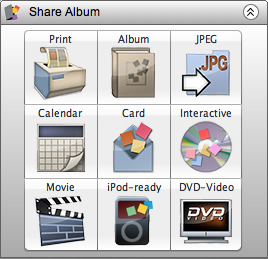
I also like that it is easy to share pages, like on the blog. They make it simple and give you lots of choices:
When have you seen a scrapbooking program that allows you to share it so many ways!
Now
there are lots of options to download more background papers,
embellishments and more- even Quick pages, which will be kept under the
embellishments area. Some have a cost, but if you are patient, you can
get stuff for Free. You can create your own pages, or us pre-designed
options. Check out
Free kits here.
This is a page that I built from scratch using various
elements they had available. IT was fairly quick to do. It wouldn't have
taken me so long if I wasn't roaming around checking out the various
options. Playing with the sizes. The buttons I used are all the same
button. I was able to alter their size for a different look. I tried 3
the same size but didn't like the way it felt. I LOVE Ric Rac and they
have quite a collection of that as well. Adding text was extremely easy
and I could change color, font, size, as well as the shape of the word
for some fun options.
There are Free quick pages and elements and designs all
the time. I have gotten so many emails with free downloads since I
started working with this. The next 2 are ones available currently on
their blog and Facebook pages. They are Halloween templates, there is
also a Halloween card freebie now. These were ready to go. I just added
the kids pictures to them. I think it is so cute. I will print these off
for the grandparents. You can change and remove elements. Like the
words "eye of newt" can be changed to whatever you want.
The
2 pages above are quick pages. They are downloaded (FREE) and found
under embellishments. Drag and drop in place. Pick a picture to add in.
Adjust the shape, or crop the picture and then choose to move it to the
back. DONE. Except the second one I added text in the notebook page
area.
BUT you can do so many things besides just scrapbooking!
This is where it gets fun and really allows you to be creative. You can
make different cards for various occasions very easily to either print
out at a store or you could print at home. I did a generic Happy
Birthday card, and a Wedding card. These took me less than 5 minutes
each to make.
I
also was able to download some templates for free on their website.
These gift tags came in very handy, because they can be pretty expensive
to buy plain ones at the stores. These ones can be personalized with
the kids pictures or of the gift recipient.
Now,
if you are not sure how to do something or get stumped, they have a
video tutorial page that is very helpful and walks you through things
step by step.
http://www.thepinktoque.com/category/mmstutorials/
I do want to Disclose, I was given a free copy of
Mymemories suite software
to review. And let's face it I am cheap, so I have also not paid for
any of the templates or extras I have downloaded . They have So many
templates you can download for free.
The other thing
that I like about this software is that you can download and use
elements from other digital scrapbook programs and sites or make your
own. There is a tutorial on how to do it. Your options are unlimited.
You can also take paper you have and scan it into your computer and use
it as a digital scrapbook background, or same for momentos- ticket
stubs, napkins from weddings, etc.....
I have several
projects in the works for upcoming posts- like Halloween treat bags for
my daughters preschool class. Many things for my son's first birthday.
Stay tuned to see what else I have used this great
digital software program for.
Are
you interested yet? Ok So for some of the details. This program costs
$39.97. However, for my readers you can get $10 off the purchase of the
My Memories Suite Scrapbook Software- $29.97, AND $10 coupon to use at
the MyMemories.com store ($20 value)
Just go to the website:
CODE: STMMMS72256
Feel Free to share this code with anyone and everyone. I am all about saving money.
They have a great social media presence:
Blog- http://blog.mymemories.com/
Facebook- https://www.facebook.com/pages/MyMemories/140359372717593
Twitter- http://twitter.com/#!/mymemoriessuite
Since this is already a long post, check out the next post for details of the Giveaway of this product!!
One Lucky Begintocraft Reader will Win a Free copy of
MyMemories Suite software!